
SQLD Exam Pass Review and Study Materials
SQLD Certification Success Story
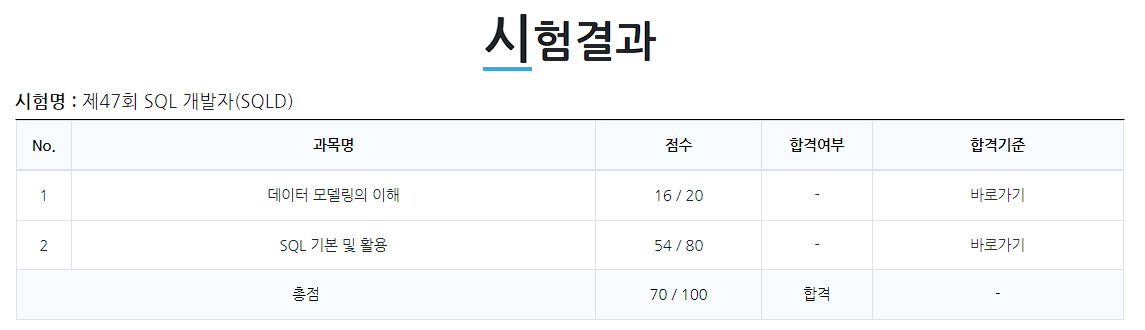 이미지를 불러올 수 없습니다.
I passed the 47th SQL Developer Certification Exam. Since this is the first certification I’ve earned after completely changing my career path, I feel a great sense of pride.
At first, I wanted to dedicate about a month to it, but I ended up wasting quite a bit of time—either getting swamped with other tasks or approaching it too theoretically—so I do have some regrets. I’m leaving a record here of the points I confirmed while studying.
The final section contains concepts I organized personally, and since there are practical details or edits I made to help me memorize them scattered throughout, there may be some parts that don’t quite match up! Still, since this might help someone, I’m leaving the entire content as is and plan to edit it later if I think of anything.
Time Spent and Study Method
I actually spent about two weeks on this, with about one week dedicated to solving practice problems.
At first, I wanted to study using the concept explanations provided by [Data on Air](https://dataonair.or.kr/
) as a standard approach, but I gave up on that early on after realizing that the SQLD exam itself features far more questions based on practical SQL syntax than on theoretical concepts. However, I still think the content itself is good, so I recommend checking it out if you have the time!
Next, I got a general overview by watching various types of lectures on YouTube. Since there are quite a few well-organized lectures specifically for the SQLD exam, it should be sufficient to just pick the ones that look promising.
Finally, there’s the practice problems. For these, there are resources available on related forums or blogs that have compiled past exam questions. While the book commonly known as the “Yellow Book” is good, it’s important not to neglect the solutions to past exam questions! For the Yellow Book, I only read through the first two chapters once and organized my error log; I spent the rest of my time entirely on solving past exam questions.
The website I personally recommend for a collection of reconstructed past exam questions is [this blog](https://yunamom.tistory.com/category/자격증/SQLD 기출문제
). This is because you can immediately check whether your answer is correct simply by entering it.
Concept Review
Note: Since Chapter 1 has fewer practice problems than Chapter 2, it was prioritized lower; consequently, only the necessary content is included here, so the coverage may not be exhaustive.
Chapter 1
Classification of Entities
-
Basic / Key Entities
-
Central Entities
-
Activity Entities
Data Modeling
-
A business analysis technique from a data perspective for building information systems
-
Representing real-world data using agreed-upon notation
-
The analysis and design process for building a database
Points to Note When Performing Data Modeling
-
Redundancy
-
Inflexibility
-
Inconsistency
Types of Data Modeling
-
Conceptual: High level of abstraction; comprehensive and business-centric approach
-
Logical: Accurately represents keys, attributes, and relationships; designed for high reusability
-
Physical: Designed to be portable to an actual database and takes physical characteristics into account
Structure of a Database Schema
-
External
-
Conceptual
-
Internal
Steps for Creating an ERD
- Draw the entities.
- Arrange the entities appropriately.
- Define the relationships between entities.
- Label the relationship names.
- Specify the degree of participation in the relationship.
- Indicate whether the relationship is mandatory.
Characteristics of an Entity
-
Information required and managed within the specific business process
-
Must be a unique identifier.
-
Has two or more instances.
-
Must be used in practice.
-
Must have attributes.
-
Must form at least one relationship.
1개 엔터티: 2개 이상의 인스턴스 집합 + 2개 이상의 속성
1개 속성: 1개 이상의 속성값
Classification of Attributes by Characteristics
-
Basic Attributes
-
Design Attributes
-
Derived Attributes
Domain
-
The range of values each attribute can take
-
Specifies the data type, size, and constraints for attributes within an entity
Naming Attributes
-
Names must be those used in the relevant business context.
-
Do not use descriptive attribute names.
-
Avoid using abbreviations.
-
Ensure uniqueness across the entire data model.
ERDs do not distinguish between ontological and behavioral relationships. However, Class Diagrams do make this distinction and must describe association and dependency relationships.
Relationship Notation
-
Relationship Name: The name of the relationship
-
Relationship Degree: 1:1, 1:M, M:N
-
Relationship Specification: Required, Optional
Reading Relationships
-
Read the reference entity as "One" or "Each."
-
Read the relationship participation of the target entity.
-
Read the relationship specifier and relationship name.
Types of Identifiers
-
Representativeness: Primary Identifier vs. Secondary Identifier
-
Self-Generation: Internal vs. External
-
Single-Attribute Identification: Single vs. Composite
-
Semantic Significance: Natural vs. Artificial
Characteristics of Primary Keys
-
Uniqueness
-
Rarity
-
Immutability
-
Existence
Performance Data Modeling
Reflecting performance-related considerations in data modeling to improve database performance
Targets of First Normal Form
-
Separation of redundant attributes
-
Row-level redundancy
-
Column-level redundancy
Denormalization
By duplicating, consolidating, or separating normalized entities, attributes, and relationships, system performance is improved, and development and operations are simplified. This is performed when performance degradation is expected, even if it may compromise data integrity.
Procedure
-
Identify targets for denormalization
-
Frequency of range processing
-
Massive range processing
-
Statistical processes
-
Number of table joins
-
-
If alternative methods are available, consider redirecting to those methods
-
Use view tables when there are many joins
-
Use clustering when processing large volumes of data
-
Split data using partitioning when holding large volumes of data
-
Index maintenance
-
Modify application logic
-
Super/Subtype Data Model Transformation Techniques
Individual Transactions -> Individual Tables Super + Sub-types -> Super + Sub-tables Entire Data Set -> Single Table
Criteria for Determining Primary Key Order
-
Specify to enable efficient use of indexes
-
The value of the attribute located at the beginning should serve as the comparison operator
-
Preferably use '=', BETWEEN, or '<>'
Advantages and Disadvantages of Distributed Databases
*
Advantages
-
Local autonomy; enables gradual system capacity expansion
-
Reliability and availability / Efficiency and flexibility
-
Fast response times, reduced communication costs, and better accommodation of local user needs
-
Increased data availability and reliability; scalability of system size
Disadvantages
-
Increased development costs and potential for errors, higher processing costs, and threats to data integrity
-
Difficulties in the design process, administrative complexity and costs, inconsistent response times, and difficulty in control
Chapter 2
Types of SQL Statements
DCL
Data Control Language, commands for managing permissions
GRANT
-
Used to grant permissions
-
Used in the form: ``GRANT {permission} ON {table} TO {user};`
(e.g.,
```text
WITH GRANT, WITH ADMIN의 비교

GRANT: 특정 사용자에게 권한 부여가 가능한 권한을 부여, 부여한 부모의 권한이 회수될 때 자식의 권한도 회수
ADMIN: 테이블에 대한 모든 권한을 부여, 부여한 부모의 권한 회수와 관계 없는 권한
```
`)
REVOKE
-
Used to revoke permissions
-
Used in the form: ``REVOKE {permission} ON {table} FROM {user};`
`
*
Types of Permissions:
ALL -- 모든 권한 부여
SELECT INSERT UPDATE DELETE /*  */
REFERENCES ALTER INDEX /*  */

/* ROLE: 다양한 권한을 하나의 그룹으로 묶어서 관리 */
CREATE ROLE {role_name}; -- 권한 그룹 생성
GRANT {permission_type} TO {role_name}; -- 해당 그룹에 권한 등록
GRANT {role_name} TO {user_1}, {user_2}...; -- 다른 유저들에게 권한 그룹 부여
DDL
Data Definition Language: Commands that define data
Supports Auto Commit in SQL Server
CREATE
-
Creates table structure
-
Used in the form: ``CREATE TABLE {table_name} {table_elements};`
`
```sql
CREATE TABLE EXAMPLE (
/*
  컬럼명은 영어, 한글, 숫자 전부 가능
  첫 글자를 문자로 지정해야 하며, 컬럼의 데이터 타입은 반드시 설정해야 한다.
*/
		NAME  varchar2(max_length)  -- 최대 길이를 가진 가변길이 문자열
  	ID번호 char(length)          -- 고정된 길이 문자열
		나이_2 number(max_length)    -- 숫자형 데이터 타입
  	생일   date                  -- 날짜형 데이터 타입
);
```
##### CONSTRAINT (Conditions)

* default: Specifies a default value

* not null: Prevents null values

* primary key: Specifies a primary key (not null, unique, multiple allowed)

* foreign key: Specifies a foreign key (multiple allowed)
*
ALTER
-
Used to modify the structure of tables and columns, including changing, adding, or deleting names and properties
-
Used in the form ``ALTER TABLE {table_name} {detail_order} {detail_property(if need)} TO {change_target};`
`
#### Detailed Commands

* RENAME: Renames a table or column

* MODIFY: Changes a column's properties

* ADD: Adds a column

* DROP: Removes a column

* ADD CONSTRAINT / DROP CONSTRAINT: Adds or removes constraints
RENAME
-
Allows you to change the names of tables and columns without using ALTER
-
Allows you to change multiple table names simultaneously
DROP
- Allows you to remove tables and columns without using ALTER
*
#### TABLE {table_name} CASCADE CONSTRAINT

* An option unique to Oracle; it does not exist in SQL Server

* For foreign key constraints, the referenced table is dropped first, followed by the dropping table.

* All foreign key constraints referencing the data in the dropped table are also removed
TRUNCATE
-
Initializes the table (not a delete!)
-
Only the internal data is removed; the table’s existence and columns remain.
*
#### DROP vs TRUNCATE vs DELETE

* DROP: Removes the entire table and releases memory

* TRUNCATE: The table and columns remain, but memory is released for the remaining data

* DELETE: Removes records; a log of the data remains, allowing for rollback until the change is applied; no memory is released
DML
Data Manipulation Language, commands for manipulating records
INSERT
-
Inserts data into records
-
Used in the form ``INSERT INTO {table_name} {column_name} VALUES {change_column_name};`
`
- You can insert data without specifying column names, but if you do not specify them, all values must be provided.
UPDATE
-
Modifies existing data
-
Used in the form: ``UPDATE {table_name} SET {column_name} = {column_value} WHERE {condition};`
`
DELETE
-
Removes existing data
-
Used in the form: ``DELETE FROM {table_name} WHERE {condition};`
`
FROMcan be omitted
*
SELECT
-
Retrieves specific data
-
Used in the form: ``SELECT {select_target} FROM {select_origin} WHERE {condition};`
`
- Conditions can also be added in the form: ``GROUP BY {calc_type} HAVING {condition} / ORDER BY {sort_condition}`
`
#### DISTINCT

Condition to retrieve data without duplicates: (a, b, NULL, a, b, NULL) => (a, b, NULL)
COUNT
(\*): Counts the total number of rows, including NULL values

({column_name}): Counts the number of rows in a specific column, excluding NULL values
TCL
Transaction Control Language, transaction control commands
Transaction: An operation that changes the state of the database
* transaction의 특징
고립성: 실행되는 동안 다른 transaction에 영향을 받아 잘못된 결과를 만들면 안됨
일관성: 실행 전 데이터베이스에 잘못된 점이 없다면 transaction 수행 후에도 내용에 오류가 있으면 안됨
지속성: transaction이 갱신한 데이터베이스 내용은 영구적으로 저장
원자성: transaction에서 정의한 연산은 모두 성공적으로 실행되거나 전혀 실행되지 않음 (All or Nothing)
COMMIT
- Applies changes to the data in the database
SAVEPOINT
-
Specify a savepoint to serve as a branching point for code segmentation
-
Used in the form: ``SAVEPOINT {savepoint_name};`
`
ROLLBACK
-
Command to revert to a previous state
-
Can roll back to a savepoint or the most recent COMMIT
-
Used in the form: ``ROLLBACK TO {rollback_point};`
`
- If no savepoint exists, the system reverts to the most recent COMMIT
Benefits of TCL
-
Ensures data integrity
-
Allows verification of data changes before making permanent modifications
-
Enables grouping and processing of logically related tasks
Functions
String Functions
Frequently used when specifying conditions such as SELECT and WHERE
LOWER
- Converts an English string to lowercase
UPPER
- Converts an English string to uppercase
*
CONCAT
-
Concatenates two strings
-
Equivalent to Oracle's '||' and SQL Server's '+'
SUBSTR
- Removes characters from the Mth position, leaving N characters
LENGTH, LEN
- Returns the length of a string, including spaces
*
TRIM, LTRIM, RTRIM
- Removes all specified characters from both ends; if no characters are specified, removes spaces
Numeric Functions
ROUND
- Rounds
TRUNC
- Truncates
*
CEIL
-
The smallest integer greater than or equal to the number
FLOOR
- The largest integer less than or equal to the number
MOD
- Modulo operation
SIGN
- Returns 1 for positive numbers, 0 for zero, and -1 for negative numbers
*
ABS
- Absolute value
Date Functions
SYSDATE
- Returns the current date and time when the query is executed
*
EXTRACT
- Used in the format ``EXTRACT ({information} FROM {data})`
`
- How to extract desired values from date data
Data Type Conversion
You can change data types using these functions
TO_NUMBER
String > Number
TO_CHAR
Number, Date > String (Generated differently depending on the format)
TO_DATE
String > Date (Generated differently depending on the format)
Basic Structure
DECODE
-
IF statement
-
When conditions are simple
CASE WHEN
-
Extended IF statement
-
When conditions require a lengthy list
*
ORDER BY
-
Sorting the retrieved table
-
Multiple criteria can be used
*
WHERE
-
IN, NOT IN: The condition is satisfied if the value matches or does not match any of the values in the list
-
IS NULL, IS NOT NULL: Determines whether the value is NULL or not, returning T / F
-
BETWEEN a AND b: Checks if a value exists between a and b and returns T/F (including a and b)
-
Comparison operators: =, >, <, >=, <=, etc.
-
A LIKE B: Finds a string similar to b for a
-
%: Indicates the presence of one or more characters
-
_: Represents a single character
명시적 형변환 vs 암시적 형변환

명시적 형변환: 함수를 활용하여 데이터 타입을 변경
암시적 형변환: 데이터베이스가 알아서 바꿔주는 것
>> 숫자 타입의 PK는 암묵적으로 인덱스가 되는데 데이터의 조회 등으로 암시적 형변환이 발생한 경우, 인덱스로 사용이 불가능
WITH
-
Can be used like a temporary table or view by using a subquery
-
Aliases can be specified
-
Treated as an inline view or temporary table
-
Used in the form ``WITH {table_name} AS {table_condition}`
`
GROUP BY
-
A command that performs grouping based on conditions
-
Different combinations of values result in different groups
HAVING
-
A conditional statement based on the state after grouping
-
Supports functions such as COUNT (count), SUM (sum), AVG (average), MAX (maximum), MIN (minimum), STDDEV (standard deviation), and VARIAN (variance)
-
Conditions such as DISTINCT (remove duplicates) and ALL (all) can be used
NULL Functions
NVL, ISNULL
-
Functions that replace NULL values with other values
-
Cannot be used if the data types are different
*
NVL2
-
A function that returns different results depending on whether the value is NULL or not
-
Returns the first parameter if the value is not NULL, and the second parameter if it is NULL
NULLIF
- Returns NULL if both parameters are the same; otherwise, returns the first parameter
*
COALESCE
- Returns the first non-NULL value
GROUP functions
Column values used for grouping and aggregation are output as NULL
The same results can be obtained using standard group functions
ROLLUP
-
Displays subtotals and grand totals.
-
The result varies depending on the order of the function’s arguments, and it returns aggregated values in a hierarchical structure.
*
CUBE
- Generates a sum of arguments for every possible grouping
GROUPING SETS
- Allows aggregation by sets enclosed in parentheses
*
GROUPING
- A function that returns 1 if a subtotal or total is calculated, and 0 otherwise
JOIN
Generally refers to the combination of tables; similar to sets
JOINs are possible between tables, between a join result and a table, and between join results
Applicable when at least one common attribute exists between the two related tables
There are ANSI-standard queries that explicitly specify JOINs and non-standard queries that do not.
When JOINs are listed, they are processed two at a time; it is not possible to process all of them simultaneously
-
Intersection
*
INNER JOIN
-
Non-standard notation, abbreviated as
-
JOINs the intersection of both tables
*
LEFT JOIN
-
When using non-standard notation, place a (+) on the left
-
Joins all rows from the left table with only the intersection from the right table
*
RIGHT JOIN
-
When using non-standard notation, place a (+) on the right
-
Joins all rows from the right table with only the intersection from the left table
*
OUTER JOIN
-
Since OUTER JOIN cannot be used with a (+) on both sides, you must use an ANSI-standard query.
-
Unlike UNION, it can be applied even if there is only one common attribute.
-
-
Union
*
UNION (ALL)
-
A join method applicable when the number of columns in the joined tables is the same and the attributes of each column are identical
-
The total amount of data becomes Data1 + Data2.
-
UNION ALL combines the data without removing duplicates
-
-
Union
Applicable when you want to examine only a single set by excluding the intersection
*
MINUS (Oracle)
-
EXCEPT (SQL Server)
-
Degree of matching between the joined entities
-
EQUI JOIN: Combines two relations using identical columns
-
non-EQUI JOIN: Combines two relations using columns that do not exactly match
ex) A.key <, >, <=, >= B.key
-
-
CROSS JOIN
-
If a JOIN is performed without a key, a Cartesian product is generated for the two tables
5개의 행 * 3개의 행 = 15개의 행으로 조회
SELF JOIN
-
A JOIN between two columns within the same table that have a relationship
-
Since both the table name and column names match, the use of an ALIAS is mandatory
Optimizer Join
- Selection of methods for performance optimization during the JOIN process; specified using hints
Hierarchical Query
Performing a query on tree-structured data
-
The starting point of the hierarchy is set using START WITH (ROOT NODE)
-
A node with no child nodes = LEAF NODE
-
Hierarchical levels are denoted by LEVEL
*
CONNECT BY
-
Determines the direction of the hierarchical structure
-
Child > Parent
-
Parent > Child
-
*
##### CONNECT BY PRIOR a = b

* Hierarchical relationships occur between records where columns a and b are identical

* Records are reordered in the sequence b -> a
SIBLINGS BY
- Determines the ordering of sibling nodes
WINDOW FUNCTIONS
Functions used to easily define relationships between records, in the form of `
SELECT WINDOW_FUNCTION {arguments} OVER {partition by column} {order_style} FROM {table};
`
WINDOW_FUNCTION
-
Window functions
-
Aggregate functions within a group: COUNT, SUM, MIN, MAX, AVG, etc.
-
Ranking functions within a group
Even when using rank functions, sorting is not performed automatically, so you must use the ORDER BY clause.
*
RANK
-
Assigns the same rank to records with the same rank
-
Does not count records with the same rank as a single instance
*
DENSE_RANK
-
Assigns the same rank to records with the same rank
-
Counts records with the same rank as a single record
*
ROW_NUMBER
- Assigns a unique rank to records with the same rank
-
-
Functions related to ratios within a group
*
PERCENT_RANK
- Returns the percentile rank within a partition based on "order" rather than the value
*
NTILE(n)
- Returns the value obtained by dividing the total count into n equal parts per partition
*
CUME_DIST
-
Returns the cumulative percentage of records within the partition that are equal to or less than the current row's value
-
Returns a value between 0 and 1 on the cumulative distribution
-
Row Order Functions Within a Group
*
FIRST_VALUE
- Returns the first value within a partition
*
LAST_VALUE
- Returns the last value within a partition
*
LAG(column_name, record_difference)
- Retrieves the previous row
*
LEAD(column_name, record_difference, value_if_null)
-
Retrieves the next row.
-
DEFAULT = 1
-
ARGUMENTS
- Arguments (column names, etc., the targets on which the function operates)
*
PARTITION BY
- Criteria for partitioning table records
ORDER BY
- Specifies the criteria for sorting records within the partitioned records or across the entire table
*
WINDOWING
-
Defines the range of records on which the function operates
*
RANGE
- Used when specifying a range
*
BETWEEN a AND b
- Applies from a to b
*
UNBOUNDED PRECEDING
- Start position = first row
*
UNBOUNDED FOLLOWING
- Starting position = last row
*
CURRENT ROW
- Starting position = current row
Table Partitioning
Storing a large table by splitting it into multiple data files
Stored in physically separate data files => Improved performance and independent management
Effectively narrows the scope of queries => Improved performance
RANGE PARTITION
- A method of storing data by partitioning based on value ranges
LIST PARTITION
-
Partitioning based on specific values
-
HASH PARTITION
- A method where the database management system uses its own hash function to partition and manage data
Optimizer
Even for the same SQL statement, performance varies depending on how it is executed (performance metrics: execution time, resource usage, etc.)
Therefore, it is necessary to analyze the SQL statement and create an execution plan based on certain criteria; this is where the optimizer is used.
The optimizer can affect execution performance, but it does not change the result.
SQL문 작성 => 파싱 (문법 검사, 구문 분석) => 옵티마이저 (비용 기반 / 규칙 기반) => 실행 계획 (PLAN_TABLE 저장) => SQL 실행
*
Cost-Based
-
In the latest Oracle versions, the cost-based optimizer is used by default
-
Calculates the total cost of executing the SQL statement using system and object statistics, then establishes the execution plan with the lowest cost
Rule-Based
-
Develops an execution plan based on 15 priority rules
-
Generally, a scan based on ROWID has the highest priority
INDEX
-
Sorted by index key => Faster lookup
-
Primary keys (PKs) are automatically indexed
-
Multiple indexes can be created on a single table, and a single index can consist of multiple columns
-
Created and sorted in descending order
-
It is not advisable to index attributes that change frequently
-
For secondary indexes, duplicate data can be inserted unless the index has a UNIQUE constraint.
-
A full table scan may be more efficient and cost-effective than an index scan
-
Partitioned tables can have partition key indexes created for each partition; these are called global indexes
-
As the number of indexes increases, so does the amount of data, which can lead to slower insert, delete, and update speeds
-
Indexes can be created on all data types
-
Types of indexes include sequential indexes, bitmap indexes, composite indexes, clustered indexes, and hash indexes.
*
#### SCAN Methods<br />


*

  ##### Index Unique SCAN

  * Searches using the index key when the key values are unique

*<br />


  ##### Index Unique SCAN

  * Scans the specified range using a WHERE clause

  * Depending on the range, it may return a single result or no results at all

*<br />


  ##### Index Full SCAN

  * Scans the entire index from start to finish
Types of Optimizer Joins
*
#### Nested Loop JOIN

* First queries the outer (driving) table to find the data to be joined, then joins it with the inner (driven) table

* Throughput is determined by the processing range of the driving table; therefore, it is necessary to find a driving table with a small size

* Both row-level and table-level processing occur sequentially

* It is important to find the optimal order

* Since random access occurs (when the driving table references the second table), random access must be minimized to reduce performance latency

* In cases where the driving table’s processing range is large or the random access range is extensive, this method may be less efficient than a Sort Merge Join

* "Index required"; advantageous with a unique index

* Useful for Online Transaction Processing (OLTP)

* Same format as nested loops; executed iteratively as many times as there are rows that satisfy the conditions of the leading table
*
#### Sort Merge JOIN

* Sorts each of the two tables and merges them upon completion

* Performance slows down when data volume is large due to the sorting process

* Performance degrades when a large amount of data is sorted because temporary disk space is used

* Supports both EQIU JOIN and non-EQIU JOIN
HASH JOIN
* Load the smaller of the two tables into hash memory and create a hash table using the join keys of both tables

* Scan both tables simultaneously

* The "smaller data" must come first in the leading table

* Can maximize utilization of system resources, but may consume excessive resources and raise concerns about system load

* Demonstrates fast processing speeds for large-scale data

* Available only with EQUAL JOIN

* Does not use indexes

* JOIN methods

  ```text
  먼저 선행 테이블을 결정, 선행 테이블에서 주어진 조건에 해당하는 레코드를 선택
  해당 행이 선택되면 JOIN Key를 기준으로 해시 함수를 사용
  해시 테이블을 메인 메모리에 생성, 후행 테이블에서 주어진 조건을 만족하는 행을 찾음
  후행 테이블의 JOIN Key를 사용해서 해시함수를 적용, 해당 버킷을 검색
  ```
PL/SQL
A language that extends SQL to enable various forms of procedural programming
-
Structured in blocks, allowing for modularization by function
-
Begins with a DECLARE statement, allowing variables and constants to be declared and used
- DECLARE, BEGIN–END are mandatory; EXCEPTION is optional
-
Uses various procedural language features such as DML, IF, and LOOP
-
Built into Oracle and compatible with programs using the same language
-
Improves application performance
-
Allows the creation of Procedure, User-Defined Function, and Trigger objects.
- Procedural code written within a procedure is processed by the PL/SQL engine, while standard SQL statements are processed by the SQL executor.
Distributed Database
A database system (DBMS) that controls physically separate databases over a network
-
Improved performance: Distributed databases perform parallel processing, resulting in faster speeds
-
Modular design allows for system updates without affecting other modules
-
Capacity can be expanded by adding distributed databases
-
Easy to protect critical data
-
High reliability
-
Difficulties in management and control
-
Difficulties in security management and integrity control
-
Complex structure
메모

count(*): 전체 행의 수를 카운팅, null 포함
count({column_name}) null 을 제외한 행의 수를 카운팅
null: 모르는 값을 상징, 값의 부재를 말함
(null is null) = TRUE
null과의 모든 비교는 null 반환
0 혹은 ' '과 동일한 값이 아님

서브쿼리: SELECT문 내의 SELECT문이 반복 사용된 쿼리, 단일행 및 다중행으로 구분
- 정렬을 수행하는 ORDER BY를 사용할 수 없다.
- 여러 행을 반환하는 서브 쿼리는 다중 행 연산자를, 단일 행을 반환하는 서브쿼리는 단일 행 연산자를 사용
- 메인 쿼리에서 서브 쿼리의 컬럼을 자유롭게 사용할 수 없음
- EXIST는 True 혹은 False를 반환한다

스칼라 서브쿼리: 한 행과 한 컬럼만 반환하는 서브쿼리
인라인뷰: 서브쿼리가 FROM 절 내에 쓰여진 것

view 테이블
- 사용상의 편의를 위해 사용
- 수행속도의 향상을 위해 사용
- SQL의 성능을 향상시키기 위해 사용
- 임시적인 작업을 위해 사용
- 보안관리를 위해 사용

실행 순서
SELECT ALIAS => FROM => WHERE => GROUP BY => HAVING => SELECT => ORDER BY

조회 행수 제한
몇 번째 행을 조회하는지 부여하는 조건문
ROWNUM {row_number}: Oracle
TOP {row_number}: SQL Server
LIMIT {row_number}: MySQL

ROWID
해당 데이터가 어떤 데이터 파일 상에서 어느 블록에 저장되었는지 알려준다.
데이터베이스에 저장되어 있는 데이터를 구분할 수 있는 유일한 값이다.
ROWID의 번호는 데이터 블록에 데이터가 저장된 순서이다.
테이블에 데이터를 입력하면 자동으로 생성된다.
댓글 작성
게시글에 대한 의견을 남겨 주세요.